For fifteen years I built company sites on Drupal, WordPress and Webflow. Every one of them came with a developer, a plug-in bill and a tool I had to ask permission to change.
Then the LinkedIn posts started. First solo founders, then marketing leaders I respect, then well-funded startups, all saying a version of the same thing: we moved the whole site to Claude Code, and it was easier than we thought.
So I set myself a challenge on a Monday. By Friday, a few spare hours in, growthprotocol.co was live. No developer, no page builder, no budget beyond the Claude subscription I already had.
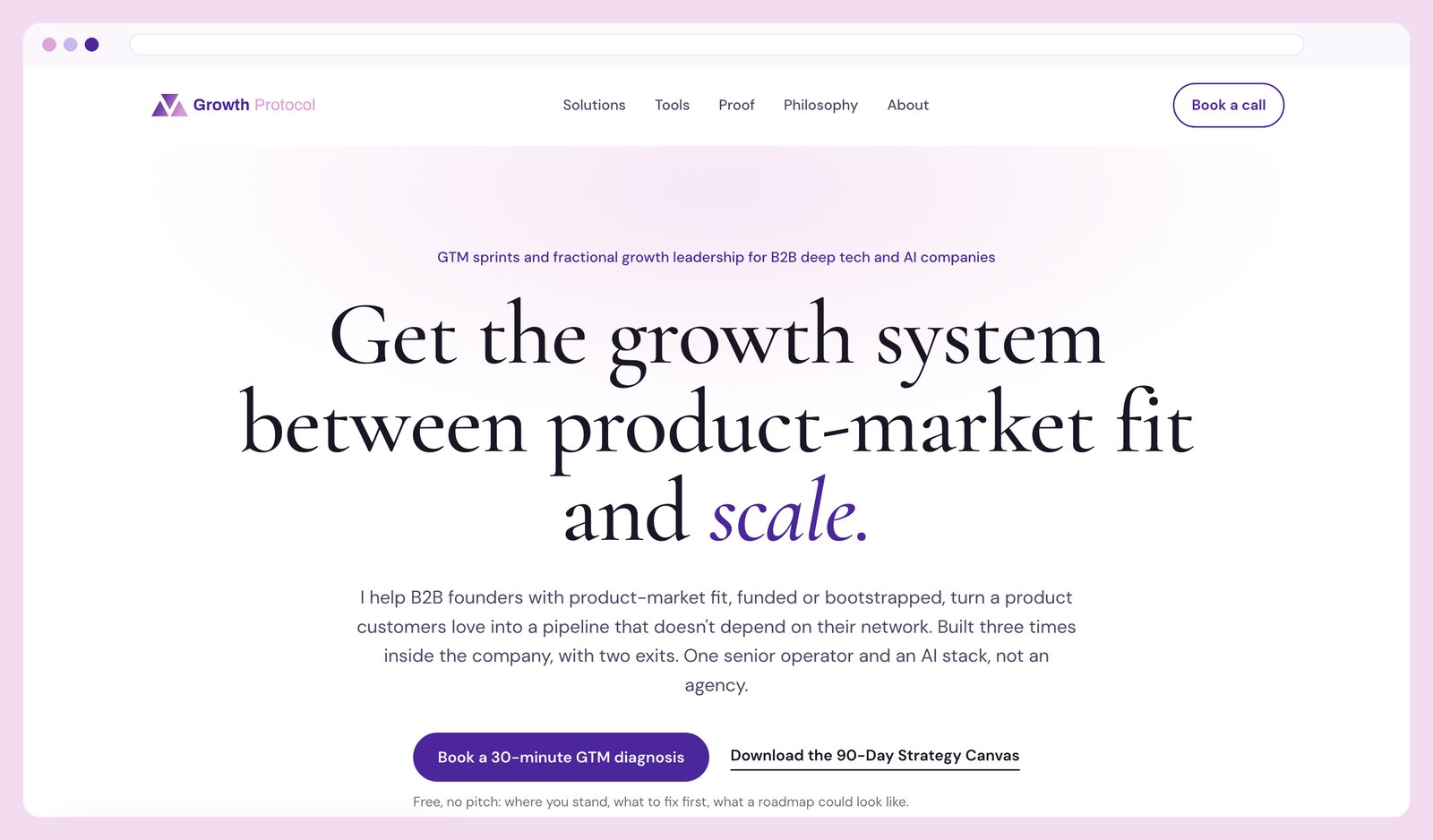 growthprotocol.co, a week after the Monday challenge. Built with the exact steps below.
Here is what I believe now: anyone who wants to can ship a personal site, a small company site or a side project with Claude Code in a few hours. The barrier to putting an idea in front of the world has never been this low. And the same method builds mini products, not only sites.
This post is the fast version. Read it, follow the steps, ship tonight. If the site then has to carry a company, part 2 of this series goes deeper.
What really made me do it
Not the technology. Three things I could not get from any platform I had paid for.
It is free. Beyond a Claude subscription, every piece of this stack is free or open source: the framework, the code hosting, the site hosting, the analytics, the forms. A page builder starts cheap and adds a CMS plan, a second language, more storage, a form tool, an analytics add-on. This stack costs a Claude subscription and a domain, and nothing else.
Zero dependency. No CMS to learn, no developer to wait for, no designer to brief. The design is written once in a text file and applied every time. The site is files in a folder, on a domain I control, built by tools I can read. When something breaks, I can go back one version in one sentence.
Shipping with AI is a skill everyone will need. Marketers, founders, job seekers: soon “I can ship with AI” will be on every CV that gets read. A website is the safest place to learn it, because the result is public, the stakes are low and you can see every change.
Who this is for
- Founders before product-market fit who need a site that looks like a company, not a template, and who will rewrite it four times this year.
- Job seekers and fractional leaders who want a personal site with a point of view, a few proof points and a way to book a call.
- Solo marketers and side-project builders who are tired of waiting for someone else to change a headline.
Not yet for you if you run a catalogue, need user accounts or have five editors publishing daily. That is part 3.
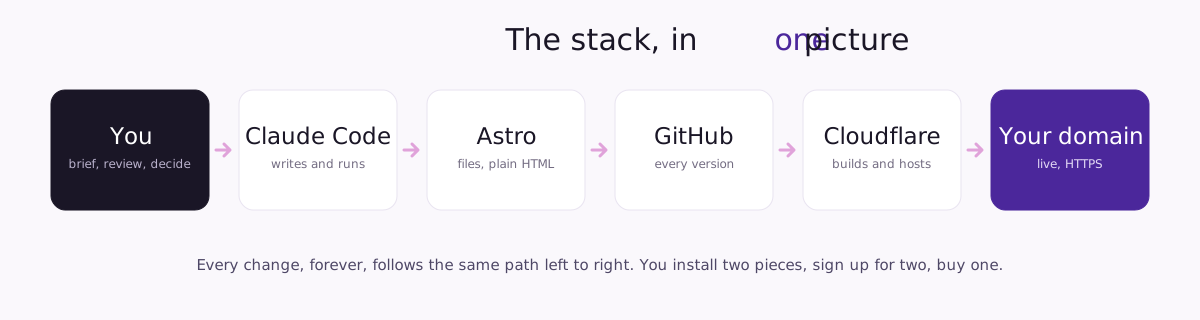
The stack, in one picture
Five pieces. You install a few things once, sign up for two free accounts, buy one domain.
| Piece | What it does | What you pay |
|---|---|---|
| Claude Code | Writes the code, runs the commands, previews the site, explains what it did | Part of a Claude subscription |
| Astro | The website framework. Turns your content into plain, fast HTML | Free, open source |
| GitHub | Stores the site and every version of it. Your undo button and your handover | Free |
| Cloudflare | Hosts the site, serves it over HTTPS, sells the domain, counts visitors | Free, plus the domain |
| Your domain | The address. Buy it at Cloudflare or move it there | $10 to $15 a year |
Why these? Astro because a marketing site should be HTML, not an app, and it is fast by default. Cloudflare because hosting, domain and analytics live in one free dashboard. GitHub because it is the handover: anyone can pick up the site after you. Claude Code because it runs in your folder, not in a chat window, so it can install, build, test and fix.
Step 0: get comfortable with the unfamiliar
You are about to do things you have never done on your computer. You will open the terminal, watch lines of text scroll past, and wonder if it is working. That is normal.
None of it requires understanding. It requires following the protocol. Every step below says what to type and what you will see. If you accept to go with the flow for an evening, it is easier than you expect, and by the end you will own something most marketers never have: a site nobody can take away from you.
Claude Code asks permission before it runs a command or creates files. Read the line, say yes.
The first rule: when you get lost, ask Claude.
Take a screenshot of what is on your screen. Open a Claude conversation, or go back to the one you already have, paste the screenshot and say: “I’m blocked here.” If typing feels slow, switch to voice mode and just talk it through; it is often more natural. This one habit solves 99% of the problems you will hit.
Before any page, write the foundation
This is the step that decides whether the result looks like you or like a template. Claude Code builds from what it can read. If all it can read is your prompt, you get a generic site. Give it who you are, what you say, what you admire and how Google should find you, and you get your site.
Open a Google Doc. Write four short sections. Thirty minutes.
1. Brand: how you look and sound. Your name and one-line positioning. Two colors with hex codes (take them from your logo with any color picker). One heading font, one body font, from Google Fonts. Five words you use, five you never use. Three sentences in your voice, copied from something you wrote and liked.
2. Copy: what the site says. Headline. Sub-headline. Who it is for, who it is not for. What you offer, in three blocks. Proof: logos, numbers, two quotes. About you, in 80 words. One call to action.
3. Inspiration: three to five sites you like. This is the single biggest lever on how good the result looks, so spend ten minutes on it. Pick one or two for design: sites where the type, the spacing and the way the hero breathes feel right to you. Pick one or two for content: sites that say what they do in a sentence you envy, with proof that makes you believe it. For each, write the URL, what the site is (a design agency, a developer tool, a solo consultant), and one line on what to take from it and what to ignore. Claude Code will visit them; the context tells it why they are there, so it borrows the right thing and not the whole look.
For example: “linear.app, a software product; take the type scale and the calm spacing, ignore the dark theme. A solo consultant’s site; take how the first sentence says who it is for and what changes, ignore the layout.”
4. SEO: how Google reads it. The one search phrase each page should answer. Title under 60 characters, description under 155, one H1 per page, a canonical URL on every page, alt text on images, a sitemap. Copy the list; the playbook has the full file.
Keep the doc open. At the end of Step 1 you paste it into Claude Code once, and it becomes four small files in your site folder that every future change reads first.
Step 1: install the tools and make the folder
Twenty minutes, once. The terminal is the app where you type commands: on a Mac press Cmd+Space, type Terminal, press Enter; on Windows open PowerShell from the Start menu. You will use it for exactly two things: starting Claude Code, and nothing else.
- Node.js. Download the LTS version from nodejs.org and install it like any app. This is what runs Astro on your machine.
- Git. Mac: type
git --versionin Terminal and press Enter; if it is missing, macOS offers to install it. Windows: download from git-scm.com. - GitHub. Free account at github.com. Then install the GitHub CLI from cli.github.com, type
gh auth loginand follow the questions. Once. - Claude Code. Install from claude.com/claude-code. Type
claudein Terminal and sign in with your Claude account.
Make the site folder. In Finder or Explorer, create a folder inside Documents called sites, and inside it one named after your domain, for example Documents/sites/growthprotocol. Everything about your site will live there: the files Claude Code writes, your foundation files, your logo. Drop your logo in now. No logo yet? Skip it; Claude Code can make a simple wordmark in your heading font.
Open Claude Code in that folder. In Terminal, type cd followed by a space, drag the folder from Finder into the Terminal window (it pastes the path), press Enter. Then type claude and press Enter. You are now talking to Claude Code inside your site folder, which is where it has to be. Every time you come back to work on the site: same three moves, cd, drag, claude.
First prompt, with your foundation doc pasted after it:
Here is my foundation doc. Split it into four files in this folder: brand.md, copy.md, inspiration.md and seo.md. Keep my words. Where something is missing, add a line that says TODO and what is needed.
From here, every grey block is a prompt you paste into Claude Code.
Which model? The default model on a Claude Pro plan is enough for everything in this post. If your plan offers a more capable model, switch to it with the /model command for the two moments where judgement matters most: the first build (Step 2) and the design iterations (Step 3). Switch back for everything mechanical: wording changes, commits, checks. Those run faster, cost less of your usage limit, and need no intelligence beyond following CLAUDE.md. Plan contents change; the Claude plans page says what each includes today.
Step 2 (10 minutes): build the first version
One prompt does most of the work. It reads your four files, visits the sites you like, and builds the whole thing with the technical basics already in place.
Read brand.md, copy.md, inspiration.md and seo.md in this folder. Visit the three sites in inspiration.md and note what I like about each.

Set up a new Astro project here with static output and no UI framework. Build a one-page site that uses only the copy in copy.md, in this order: hero with headline, sub-headline and call to action; who it is for; what I offer; proof; about; final call to action; footer with email and LinkedIn.

Design: follow brand.md for colors, fonts and voice, and inspiration.md for layout, spacing and type scale. Self-host the fonts. Mobile first. Make it look like a site a designer made, not a template: generous white space, one accent color used sparingly, a clear type hierarchy, no stock illustrations.

Technical basics, done now: title, description, canonical and Open Graph tags from seo.md; one H1; alt text on every image; a sitemap and robots.txt; a favicon from logo.svg; a 1200 by 630 OG image with my name on the brand colors; a plain /privacy page with placeholder text I will replace. Do not add any analytics or third-party script.

Keep all text in src/data/site.ts so I can change words without touching components. Keep all styles in one global CSS file.

Then run the dev server and give me the local URL.
Claude Code asks one or two questions, asks permission to install and create things (say yes), creates about twenty files, and prints a link starting with http://localhost:4321. That link only works on your computer; it is your private preview. Open it in your browser. Your site exists.
One line in that prompt matters more than it looks: all the words of the site live in one file, site.ts. That is why every later change is a sentence rather than a hunt through pages.
It will not be right yet. The first version is for seeing, not shipping.
Step 3: preview, then iterate (an hour, maybe two)
Now the part only you can do. Look at it on your laptop and your phone, and say what is wrong in plain words.
The hero is too tall on mobile, cut the padding by a third. Show the logos in one row of five, grey, color on hover. Make the call-to-action button the primary color with white text. Keep everything else.
Three rules that saved me hours:
- One change per prompt when it matters. Four small prompts beat one long one, because you see each result.
- Say what to keep. “Keep everything else” stops Claude Code from redesigning the section you liked.
- Ask to see it.
Screenshot the page at 390px and 1440px and show me both.Then compare with the sites in inspiration.md:Compare the hero with the first site in inspiration.md and tell me the three biggest differences.
When it looks right, write the note every future session reads first:
Write a CLAUDE.md for this project: what the site is, where the text lives (src/data/site.ts) and the rule to edit words there only, where styles live, brand.md in short form, the seo.md rules as a checklist, the rule that npm run build must pass before any change is done, and the rule that no third-party script is added without asking me. Under one page.
Step 4 (30 seconds): push it to GitHub
Not a developer thing. GitHub is the memory of your site: every version, with a note on what changed, and the way back when something breaks.
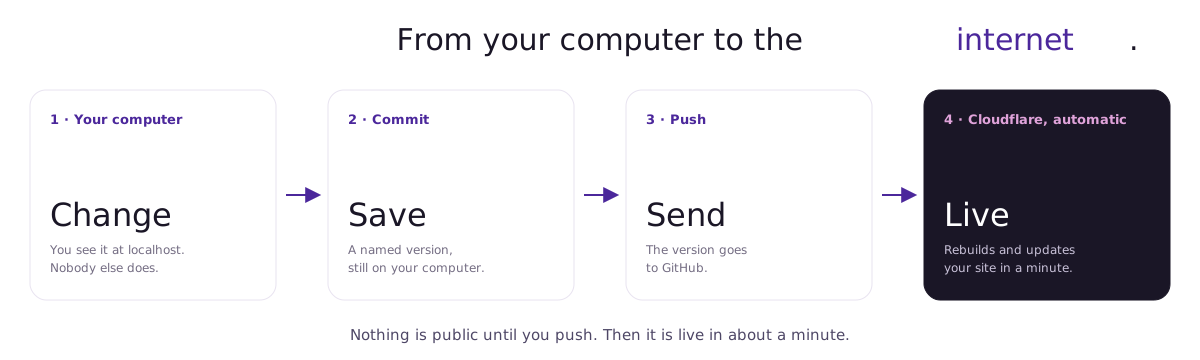
Two new words, and you will use them every day. Commit saves a version of your site with a note on what changed. It stays on your computer. Push sends that version to GitHub. Once Step 5 is done, Cloudflare watches GitHub, rebuilds your site on every push and puts it live in about a minute. Until you push, nobody sees your changes but you.
Initialize git here, add a .gitignore for Node and Astro, commit everything as "First version", and create a private GitHub repository called my-site with the gh CLI. Push and give me the URL.
Thirty seconds. After every change you like, from now on: Commit and push with a message that says what changed.
Step 5: go live on your domain (15 minutes)
The only part that happens in a browser.
- Sign up at cloudflare.com. Free plan.
- Workers & Pages → Create → Pages → Connect to Git. Pick your repository. Preset: Astro. Build command
npm run build, outputdist. Deploy. - A minute later you have a
.pages.devaddress. Open it. Your site is on the internet. - Domain. No domain yet: Cloudflare sells them at cost under Domain Registration. Own one elsewhere: point its nameservers to Cloudflare; it shows you exactly what to change.
- In the project, Custom domains: add
yourdomain.comandwww.yourdomain.com. Ten minutes later: live, HTTPS, free. - Analytics. In the same project, turn on Web Analytics. It is cookieless, so no banner is needed. If you later add Google Analytics, HubSpot tracking or ads pixels, you will need consent; part 2 covers that.
Back in Claude Code:
Set the site URL to https://yourdomain.com in astro.config.mjs so the sitemap, canonical and OG URLs use it. Redirect www to the bare domain in one hop. Build, commit and push.
Then add the domain in Google Search Console and submit /sitemap-index.xml. Free, five minutes, and the moment Google starts counting.
Step 6 (20 minutes): a way to reach you
A site with no way to contact you is a brochure. You need two things: a booking link and something that stores an email.
Booking. Create a free link with HubSpot Meetings, Cal.com or Calendly.
Email capture. Anything that stores an address works: a plain mailto: link on day one, a Typeform or Tally form, or a free CRM like HubSpot if you want the contacts somewhere you can grow into.
Store the booking link https://… once in site.ts and make every call-to-action button open it in a new tab. Add a contact section before the footer with this form embed: <paste the embed code>. Show a thank-you message on submit. If I did not give you an embed, use a mailto link to my email instead.
Want a gated download, like the playbook at the end of this post? One page with the pitch and the form, one unlisted page the form redirects to with the file. The playbook has the prompt that builds both.
From now on: the everyday loop
Every change is the same five moves. You own the first and the last.
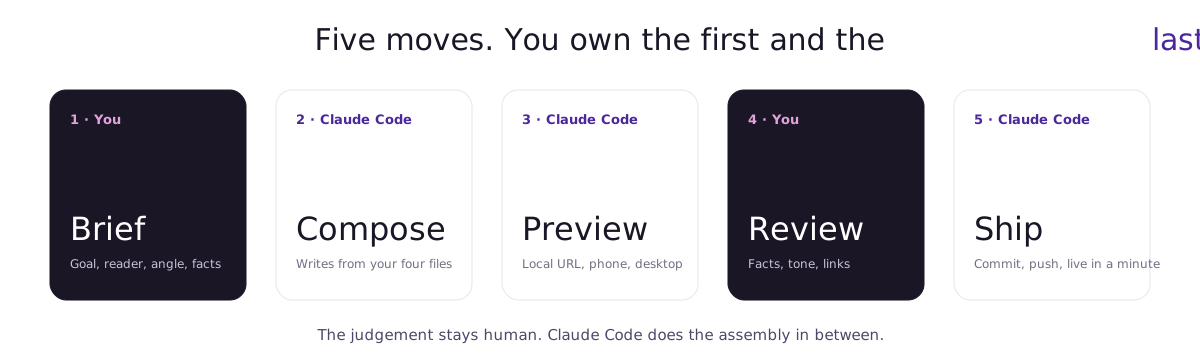
- Brief. What the page is for, who reads it, what it should say.
- Compose. Claude Code writes it from your four files.
- Preview. Local URL, desktop and phone.
- Review. Facts, tone, links. Claude Code is creative with words you did not give it.
- Ship. Commit, push. Cloudflare publishes in a minute.
A new page takes fifteen minutes. A wording change across the whole site is one sentence: Replace "GTM sprint" with "go-to-market sprint" everywhere, then build and push.
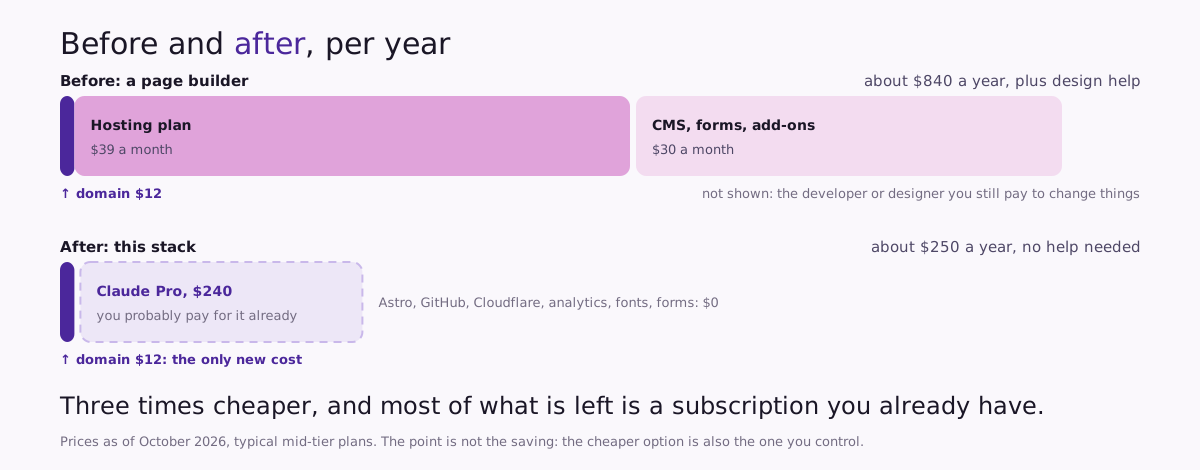
What it costs
| Page builder, typical | This stack | |
|---|---|---|
| Platform or hosting | $29 to $49 a month | $0 |
| CMS and forms | $20 to $40 a month | $0 |
| Domain | $10 to $15 a year | $10 to $15 a year |
| AI assistant | often on top | $20 a month, Claude Pro |
| Design help | agency or freelancer | written once in brand.md |
| Per year | $600 to $1,100, plus help | About $250 |
Prices checked October 2026, typical mid-tier plans; the tables are the only place in this post with numbers, so they are the only thing to update. Look at where the money goes: the Claude subscription is almost the whole bill, and if you already use Claude for other work, the site itself costs you a domain. The point is not the saving. The cheaper option is also the one you control.
Five mistakes I made so you don’t
- Copying the old site. I asked Claude Code to rebuild my Webflow page from a screenshot. It copied the clutter too. Start from the foundation and a blank page.
- Skipping the brand file. The first build used a default font and a safe blue. Thirty minutes of writing fixed every page at once.
- No inspiration list. “Make it look good” means nothing. Three URLs and one line each changed the result more than any other prompt.
- Long prompts with six changes. One result, no idea which part went wrong. Small prompts, one at a time.
- Not reading what it wrote. Claude Code once invented a client quote. Review is your job.
The tools, with prices
Everything used in this post. Prices checked October 2026.
| Tool | Purpose | Price | Free tier enough? |
|---|---|---|---|
| Claude Pro | Runs Claude Code | $20 a month | Yes, for one site |
| Astro | Website framework | Free, open source | Yes |
| Node.js | Runs Astro on your machine | Free | Yes |
| GitHub (with Git and the gh CLI) | Versions, backup, handover | Free | Yes |
| Cloudflare (Pages, Registrar, Web Analytics) | Hosting, domain at cost, cookieless analytics | Free; domain $10 to $15 a year | Yes |
| Google Fonts | Fonts, self-hosted | Free | Yes |
| Google Search Console | How Google indexes you | Free | Yes |
| HubSpot | Free CRM: forms, booking link, contacts | Free tier | Yes |
| Typeform or Tally | Forms without a CRM | Free tiers | Yes |
| Cal.com | Booking link alternative | Free for one person | Yes |
| Canva | OG image, social visuals | Free | Yes |
Get the playbook, then go further
Everything above is in the PDF: every prompt ready to paste, the four foundation templates, the install checklist, the SEO rules file, the launch checklist and the tool list. Free, no email needed.
Download the free playbook: Build your first website with Claude Code →
This post is part 1 of a series on building websites with Claude Code. It is the fast version: ship something real in a few hours and be done. Part 2 is for when the site is bigger and already exists, on Webflow or WordPress, and has to move without losing its rankings. Part 3 is for teams: several people editing, rules, review, and a site that scales to hundreds of pages.
One habit keeps this post true: twice a year I run the Step 2 prompt on a fresh folder and re-check the two tables. If the prompt still ships a site, the post stands. If not, you will see an update date at the top.